Have you ever spent ages crafting the perfect blog post, only to see it shared on social media with a blurry thumbnail or completely the wrong image? We've all been there. Those tiny previews can make a huge difference in click-through rates, and a bad one can leave your amazing content hidden in the social media abyss.
But fear not, content warriors! Today we're diving into the world of social media debugging tools. These handy helpers will ensure your carefully chosen visuals shine through on every platform, from Facebook to Pinterest. Get ready to transform your social shares and watch those clicks soar!
Now, let's meet the champion of Facebook previews: the Facebook Sharing Debugger. This free tool from Facebook for Developers is like a social media X-ray for your links. It scans your webpage and reveals exactly what Facebook sees when it fetches information for sharing.
With the Sharing Debugger, you can:
Preview
Identify missing or incorrect Open Graph tags, the secret sauce behind those perfect previews.
Fetch new information
Basically, it's your secret weapon for ensuring your Facebook shares look flawless and attention-grabbing every single time.
Stepping away from Facebook for a moment, let's focus on the professional realm with the LinkedIn Post Inspector. This nifty tool, created by LinkedIn itself, acts as your content confidante on the platform.
Think of it like a personal stylist for your LinkedIn shares. The Post Inspector analyzes your link and provides insights on how to optimize it for maximum engagement. Here's what this LinkedIn guru can do for you:
Uncover missing data
See when LinkedIn last crawled your webpage
Troubleshoot any glitches
By using the Post Inspector, you can guarantee your LinkedIn shares showcase the best possible version of your content, grabbing the attention of potential connections and boosting your professional profile.
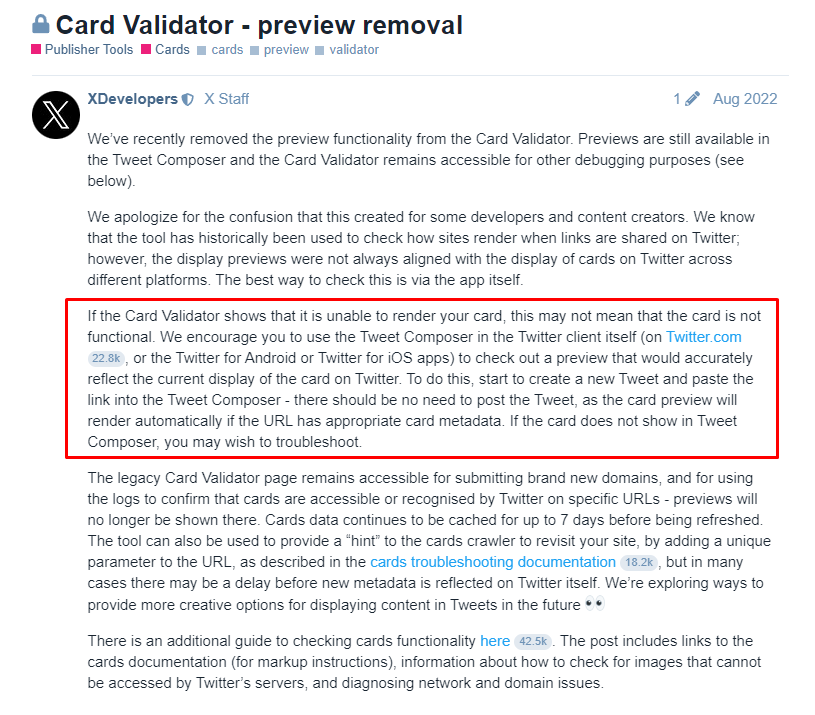
Unfortunately, Twitter doesn't offer a dedicated debugging tool like Facebook or LinkedIn. However, there are still ways to check and optimize how your link previews on Twitter.
2. Check the Preview Image by creating a new draft tweet, this will almost always fetch the latest card preview image (as said in X's community discussion about Card Validator - preview removal)
X's Developers Community
815 x 715, 66.6 KB, PNG
Now, you can simply check the preview image directly while creating a new tweet.
These are the three common platforms. If you have anything else to add, please leave a comment below. Thanks!