As a software engineer in web development, how usually have you been using Postman for testing API endpoints? In my case, I use it sometimes, but Postman is a very strong tool to play with the APIs.
So, do you use secured endpoints that require some sort of authorization? How do you do on that?
Fixed variables that need to be updated sporadically maybe.. In this case, we may need to obtain the authorization "key" after a time, and this is easy done by just creating a request in Postman to do this. But, did you know that there is a feature from Postman that can streamline this process that you don't even need to do anything to get all of your request authorized?
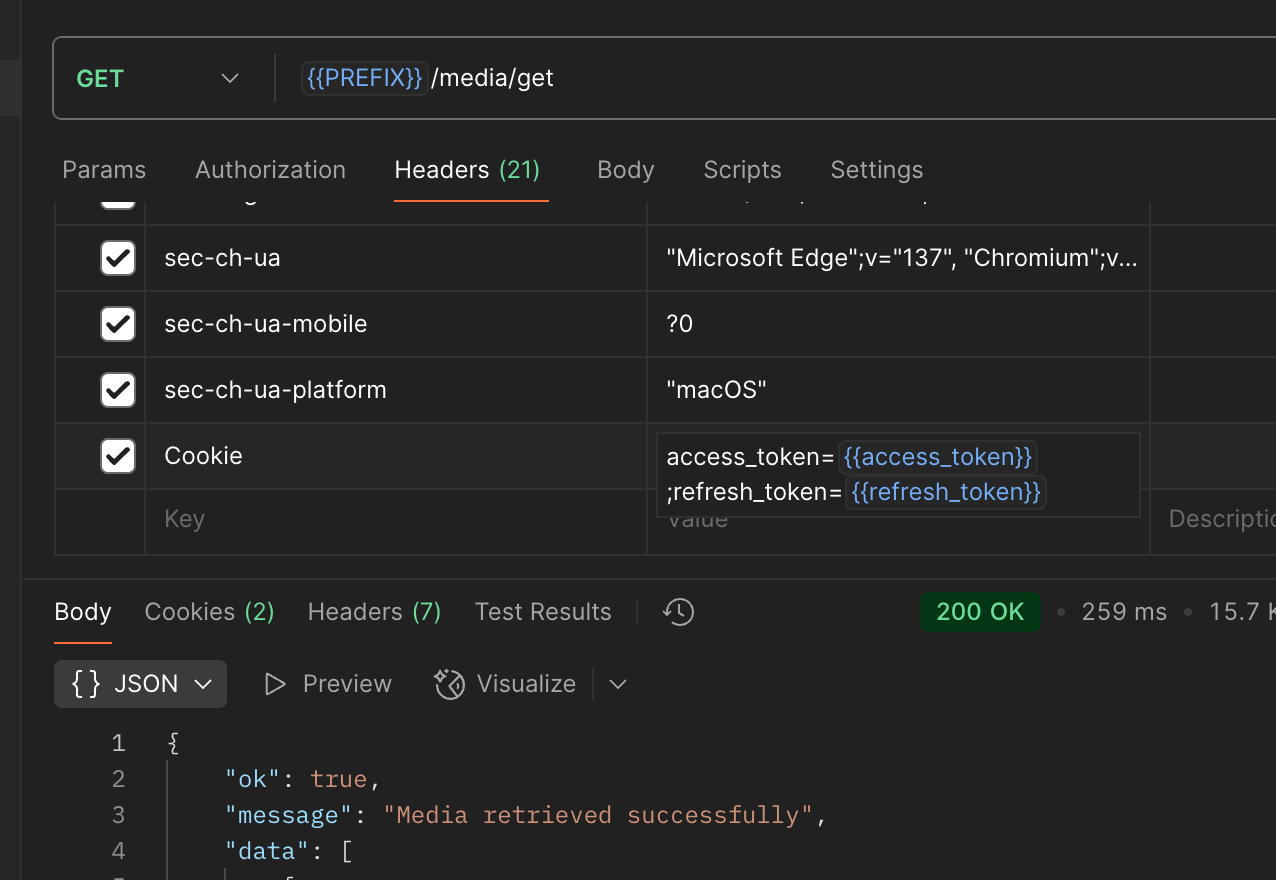
This is called Pre-request script.
1276 x 880, 99.2 KB, PNG
Get off the worry about the authorization process
How?
Simple, as the name suggests, this is a script that runs before the request, and it will update the authorization token for you so that the token will always be a valid one.
Then how to do this?
It depends on the need, but here is the setting that fit my need
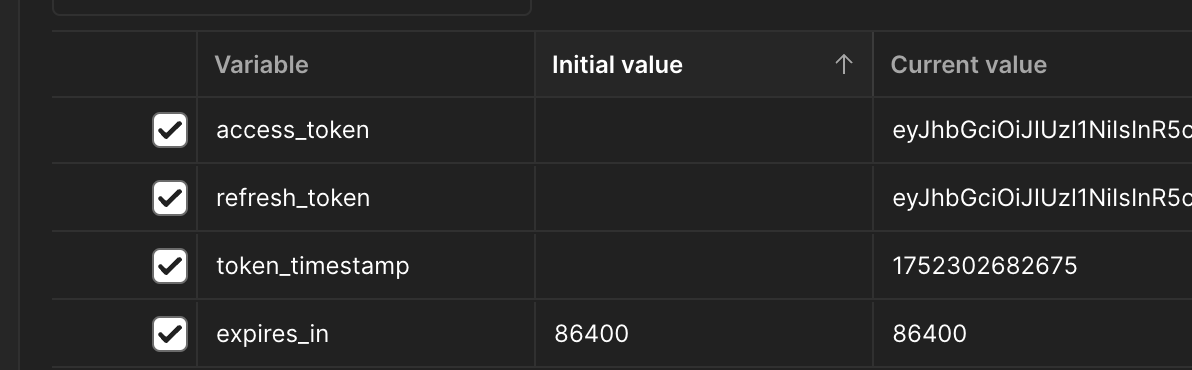
First, create 4 variables in the collection that contains all of the requests we need as below
1192 x 370, 38.8 KB, PNG
Explanation:
access_token: the token that will make the request to be valid.
refresh_token: a longer lifetime token that allows you to create a new access_token when the current one is expired.
token_timestamp: the time when the last token was obtained.
expires_in: the lifetime of the access_token in seconds.
Okay, now is for the script
js
// Function to check if the token is expired
function isTokenExpired() {
    const tokenTimestamp = pm.collectionVariables.get("token_timestamp");
    const expiresIn = pm.collectionVariables.get("expires_in");

    if (!tokenTimestamp || !expiresIn) {
        return true; // Assume expired if we don't have the necessary info
    }

    const now = new Date().getTime();
    const tokenTime = new Date(parseInt(tokenTimestamp)).getTime();
    const expiryTime = tokenTime + (parseInt(expiresIn) * 1000);

    return now > expiryTime;
}

// Main logic to refresh the token if expired
if (isTokenExpired()) {
    pm.sendRequest({
        url: 'YOUR_REFRESH_TOKEN_ENDPOINT', // Replace with your actual refresh token URL
        method: 'POST',
        header: {
            'Content-Type': 'application/json'
        },
        body: {
            mode: 'raw',
            raw: JSON.stringify({
                refresh_token: pm.collectionVariables.get("refresh_token")
                // Add any other required parameters for your refresh token endpoint
            })
        }
    }, (err, response) => {
        if (err || response.code !== 200) {
            console.log("Token refresh failed:", err || response.status);
            return;
        }

        const responseData = response.json();
        pm.collectionVariables.set("access_token", responseData.access_token);
        pm.collectionVariables.set("refresh_token", responseData.refresh_token); // In case a new refresh token is issued
        pm.collectionVariables.set("expires_in", responseData.expires_in);
        pm.collectionVariables.set("token_timestamp", new Date().getTime().toString());

        console.log("Token refreshed successfully!");
    });
}
The code snippet is straightforward, with a simple explanation: the script first check for the expire status of the token, if it is expired, it will refresh the token and set those new values programmatically to your collection variables.
How's cool is that?
Let me know if it works for you, feel free to put your comment below!