1 min read
It's just CSS

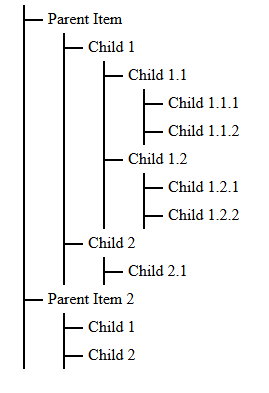
<ul class="tree">
  <li>
    <span>Parent Item</span>
    <ul>
      <li>
        <span>Child 1</span>
        <ul>
          <li><span>Child 1.1</span></li>
          <li>
            <ul>
              <li><span>Child 1.1.1</span></li>
              <li><span>Child 1.1.2</span></li>
            </ul>
            <span>Child 1.2</span>
            <ul>
              <li><span>Child 1.2.1</span></li>
              <li><span>Child 1.2.2</span></li>
            </ul>
          </li>
        </ul>
      </li>
      <li>
        <span>Child 2</span>
        <ul>
          <li><span>Child 2.1</span></li>
        </ul>
      </li>
    </ul>
  </li>
  <li>
    <span>Parent Item 2</span>
    <ul>
      <li>
        <span>Child 1</span>
      </li>
      <li><span>Child 2</span></li>
    </ul>
  </li>
</ul>
  .tree {
    list-style-type: none;
    padding-left: 20px;
    position: relative;
  }

  .tree li {
    position: relative;
    padding-left: 20px;
  }

  .tree li::before {
    content: '';
    position: absolute;
    top: 0;
    left: 0;
    width: 10px;
    height: 100%;
    border-left: 2px solid black;
  }

  .tree li span {
    position: relative;
    display: inline-block;
    padding: 5px;
    color: red;
  }

  .tree li span::before {
    content: '';
    position: absolute;
    top: 50%;
    left: -20px;
    width: 20px;
    border-top: 2px solid black;
  }

  .tree ul {
    list-style-type: none;
    padding-left: 20px;
    position: relative;
  }